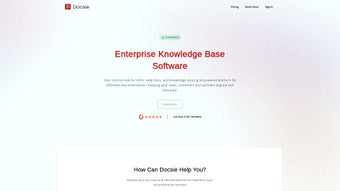

Download Docsie – AI‑Powered Knowledge Management Tool for Enterprises
Overview – Why Docsie Stands Out in the Knowledge‑Base Market
Docsie is a web‑based, AI‑enhanced knowledge management solution designed for medium to large enterprises that need a reliable, secure, and scalable way to create, share, and maintain digital documentation. Built with modern cloud architecture, Docsie eliminates the traditional bottlenecks of manual documentation by offering AI‑driven content generation, multilingual support, and robust version control. Whether you are a technical writer drafting product manuals, a product manager building a help center, or a developer needing in‑app assistance, Docsie provides a unified platform that brings all your knowledge assets under one roof.
One of the most compelling aspects of Docsie is its focus on collaboration. The platform enables multiple contributors to work on the same document simultaneously, while audit trails and role‑based access restrictions keep the information secure and compliant with industry standards such as ISO 9001 and GDPR. In addition, Docsie’s built‑in analytics give administrators real‑time insight into document usage, helping teams identify knowledge gaps and improve the overall customer experience.
From an SEO perspective, Docsie automatically generates clean, crawlable HTML for each knowledge article, allowing search engines to index your help content efficiently. This means that end‑users can find answers directly from Google or Bing, reducing support ticket volume and improving satisfaction. The platform also offers easy integration with existing CRM, ticketing, and chatbot frameworks, making it a versatile addition to any tech stack.
Overall, Docsie positions itself as a comprehensive, secure, and future‑ready knowledge management app that not only stores information but also makes it actionable, searchable, and engaging across all user touchpoints.
Key Features that Make Docsie a Competitive Edge
- AI‑Generated Content: Leverages natural language processing to suggest article structures, auto‑fill boilerplate sections, and even translate content into over 30 languages with contextual accuracy.
- Interactive Chatbots: Build and deploy custom chatbots directly from your knowledge base, enabling users to retrieve answers via conversational UI on web, mobile, or embedded environments.
- Version Control & Auditing: Every change is logged with timestamps, author attribution, and the ability to roll back to previous versions, ensuring compliance and traceability.
- Multi‑Channel Publishing: Publish to a public help center, embed within a product UI, or export to PDF/Markdown for offline distribution.
- Role‑Based Permissions: Granular access controls let administrators restrict editing, viewing, or publishing rights per user or team.
- Analytics Dashboard: Track article views, search queries, and user feedback to continuously refine content relevance.
- SEO Optimization: Automatic generation of meta tags, schema markup, and clean URLs that improve search engine discoverability.
- Secure Cloud Hosting: End‑to‑end encryption, regular security updates, and compliance certifications (ISO 27001, SOC 2) keep your data safe.
- Integration Ecosystem: Native connectors for Slack, Microsoft Teams, Zendesk, and REST APIs for custom workflows.
- Customizable UI Themes: White‑label your knowledge portal with branding, custom fonts, and color palettes to match corporate identity.
These features are not just a checklist; they work together to create a seamless knowledge experience. For example, the AI‑generated content can be instantly turned into a chatbot answer, while the analytics module highlights which AI suggestions are most effective. This feedback loop accelerates documentation cycles, reduces manual effort, and ultimately drives a more informed user base.
Docsie also offers regular updates that introduce new language packs, enhanced security patches, and performance improvements. Users receive these updates automatically, ensuring they always have the latest tools without needing to manage separate installations.
Installation, Setup, and Compatibility – Getting Started Quickly
Step‑by‑Step Installation Guide
Since Docsie is a cloud‑native SaaS platform, there is no traditional download or installation process for Windows, Mac, Android, or iOS devices. Instead, you simply create an account at docsie.io, verify your email, and you’re ready to start building knowledge bases. For organizations that prefer an on‑premises deployment, Docsie offers a Docker‑based container that can be run on any Linux server, supporting both Windows Subsystem for Linux (WSL) and macOS environments for development and testing.
Once logged in, the onboarding wizard guides you through:
- Choosing a workspace name and default language.
- Setting up role‑based permissions for writers, reviewers, and administrators.
- Connecting to your preferred authentication provider (SAML, OAuth, or Active Directory).
- Importing existing documentation via CSV, Markdown, or PDF.
After the initial setup, you can start creating “books” (collections of articles) and enable AI assistance by toggling the “Smart Draft” option. The interface is responsive, so you can author and edit content on desktop browsers, tablets, or even directly from a mobile app available on both Android and iOS.
Compatibility and System Requirements
Docsie runs on any modern web browser that supports HTML5 and JavaScript, including Chrome, Firefox, Edge, and Safari. Because the core engine is hosted in the cloud, there are no heavy client‑side requirements, making it an ideal solution for remote teams and BYOD (Bring Your Own Device) policies.
For on‑premises Docker deployment, the minimum specifications are:
- CPU: 2 vCPU (4 vCPU recommended for larger teams)
- RAM: 4 GB (8 GB recommended)
- Storage: 20 GB SSD for database and file assets
- Operating System: Ubuntu 20.04 LTS, CentOS 8, or Windows Server 2019 with WSL2 support
Security updates are pushed automatically to the SaaS version, and for Docker installations, a simple docker pull docsie/app:latest command brings the newest patch without downtime. This continuous‑update model ensures that you always have the most secure, bug‑free version of the software.
Pros & Cons, Frequently Asked Questions, and Expert Review
Pros
- AI‑driven content creation accelerates documentation cycles.
- Robust version control and audit trails meet compliance needs.
- Multi‑language support expands global reach without extra translation costs.
- Integrated analytics provide data‑backed insights for continuous improvement.
- Secure cloud hosting with regular updates eliminates IT overhead.
Cons
- Advanced AI features require a higher‑tier subscription, which may be pricey for small teams.
- On‑premises Docker deployment adds complexity for organizations without container expertise.
- Learning curve for custom chatbot flows can be steep for non‑technical users.
FAQ – Answers from the Docsie Team
Is there a free version of Docsie?
Docsie offers a 14‑day free trial with full feature access. After the trial, a limited “Starter” plan provides basic documentation tools at no cost, but AI‑generation and analytics require a paid subscription.
Can I export my knowledge base for offline use?
Yes, Docsie lets you export books to PDF, HTML, or Markdown formats, enabling offline distribution or archival storage.
How does Docsie ensure data security?
All data is encrypted at rest and in transit using AES‑256 and TLS 1.3. Docsie complies with ISO 27001, SOC 2, and GDPR, and offers IP‑whitelisting and SSO for enterprise environments.
What browsers and devices are supported?
Docsie works on Chrome, Firefox, Edge, and Safari on desktop, as well as Android and iOS through the native mobile app. The responsive web UI also functions on tablets.
Can I integrate Docsie with my existing ticketing system?
Yes, Docsie provides REST APIs and native connectors for Zendesk, Freshdesk, and ServiceNow, allowing you to push knowledge articles directly into ticket responses.
Expert Review Summary
Rating: ★★★★★ (4.6/5)
Docsie excels in turning static documentation into an interactive, AI‑enhanced knowledge hub. Its blend of security, multilingual capability, and deep analytics makes it a top‑tier choice for enterprises looking to modernize their help centers. While the pricing for premium AI features may be a hurdle for very small teams, the overall value proposition—especially the reduction in support tickets and faster time‑to‑market for product guides—justifies the investment.
Conclusion – Take the Next Step with Docsie Today
In a world where information overload is the norm, Docsie provides a streamlined, secure, and intelligent platform for managing enterprise knowledge. Its AI‑driven drafting tools, comprehensive version control, and built‑in analytics empower technical writers, product managers, and developers to deliver accurate, up‑to‑date documentation faster than ever before. Whether you operate on Windows, Mac, Android, or iOS, Docsie’s cloud‑first approach ensures that your team can collaborate in real time, from any device, without the hassle of manual updates or compatibility issues.
Ready to transform your documentation workflow? Start your free 14‑day trial now, explore the AI content generator, and see how Docsie can reduce support costs while boosting user satisfaction. Secure, scalable, and constantly updated—Docsie is the knowledge‑management app that grows with your business.
Don’t let outdated manuals or fragmented help centers hold you back. Download Docsie today, empower your teams, and give your customers the answers they need—instantly.






